Thursday, December 31, 2015

Play Clash of Clans on PC ( Android Games On PC )

Play Clash of Clans on PC ( Android Games On PC )

Play Clash of Clans on PC ( Android Games On PC )


Playing Clash of Clans (iOS | Android) on PC isn’t possible officially but still here is a guide on how to download Clash of Clans for PC covering the legit way you can follow.
You may have heard about BlueStacks or Andy or YouWave, which are the three most popular platforms that can help you play this Android compatible game right on your computer. There is no change between Android and iOS version of the game and so you need not worry about playing either one.
The method I’ll be adding down here will require initial setup and particular installation procedure. You got no other option because officially, it’s not possible to play Clash of Clans online. That’s because official developers haven’t released any official online website version of it yet.
So the only options you left with is to have a compatible iOS or Android OS running devices or play Clash of Clans on PC. Now, to go with the first case, you need to buy either iPhone, iPad or any Android-powered smartphone or tablet with at least 8GB of internal storage and 1GB of RAM, which both are the costlier option.
Requirements you need to take care of
There are many reasons why people still don’t prefer using BlueStacks or any other Android emulator software. This is mainly because they don’t get better user experience while using them which is primarily because of compatibility issues.


Every software (including BlueStacks) have certain software and hardware requirements you need to take care of before starting its installation.
Down here I’m first sharing those elements your PC needs to be match with to skip all those pure experience you may have otherwise. Following are the requirements you need to take care.
  1. Your PC needs to have at least 4GB of RAM. Having 2GB or lesser won’t help as you’re about to use second OS on your primary one.
  2. The video card driver (also known as graphic or display driver) needs to upgraded to the latest version that is compatible with HD standard of graphics.
If this graphics related requirement isn’t matched, then forget about installing Clash of Clans on PC since this game runs on full HD resolution of graphics.


Tuesday, December 29, 2015

Hack facebook and Computers Using Keylogger

Hack facebook and Computers Using Keylogger


Hack Facebook and Computers all passwords from here..watch video and Subcribe Us


How Hack Facebook or other passwords

The steps involved are mentioned below in detail:
1. First of all download the Keylogger and good binder. You can easily find it using Google.
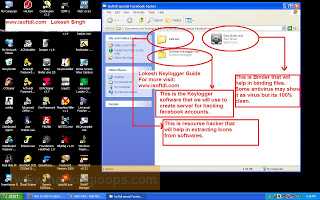
2. Extract the RAR file. Now you will get one Folder and three files as shown in below snapshot:


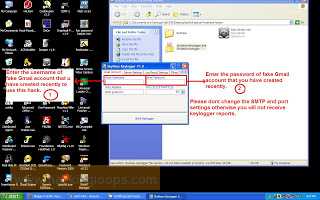
3. Now open the Keylogger file. Here you will need gmail ID and password. For safer use create a fake Gmail account and use it here as shown below:


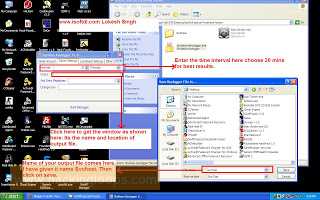
4. Now Click on server settings as shown. Here enter the time after which you want to receive reports, its always preferable to use 20 min timer for receiving files.  And Click on Output box to choose location of file and give it any name. Its always recommended to use system process name to make it undetectable like svchost or check any process name from your task manager and name it. Other fields are optional. The complete snapshot is shown below:

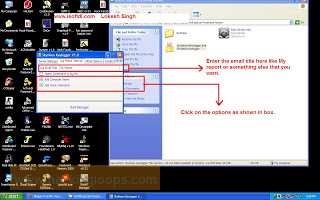
5. Now Click on Log and Result Setting. In Log EMail Title enter the subject of email like My keylogger report or simply my report or something else that you like. Also Click the last two options that i.e add Computer name and add victim name. The snapshot is shown below:

6. Now Click on Other Options.  In this section you just have to do one thing. Most hackers prefer warning message POP up but I love keylogger using any message. So unclick message button. Because when you bind it with any other software then it should not any warning messages otherwise it will be detectable.


7. Now at last click on Build Keylogger. Now after you click on it you will see your keylogger file at location that you have chosen in 4th step. Now this keylogger server file will be used to bind with any other software in Binding Step.


8. Now you keylogger server is ready that you will use to hack Facebook accounts. That’s all for the server creation step now move to second main step.

Step 2.: Extracting the Icon file from any installer(resource hacker)
1. Open the Resource hacker folder and open the reshacker file.
2. Now go to its menu and open any setup file. Suppose we want to attach our keylogger to Ccleaner setup file. So open the Ccleaner setup with resource hacker. 
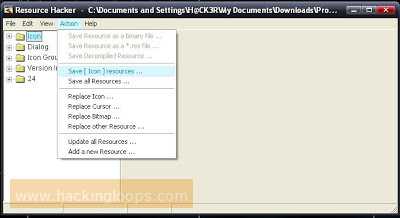
3. Now in menu there is one action button click on it and then click save all resources.


4. Now save all the resources to desktop or any other location of your choice.
5. It consists of two files one is icon file and other is res file . We only need icon file, so you can delete the other file i.e res file.
6. Now we have Icon of installer file(as discussed above Ccleaner setup Icon).


Step 3: Bind the Keylogger server with any software
1. Now Go to keylogger folder and open the Binder.
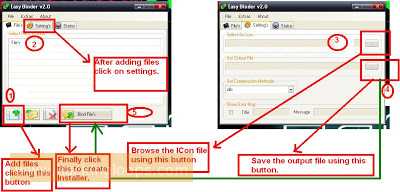
2. Now Click on + button given below to add files.
3. Now add the keylogger server and the set up of software (i.e. in our case it’s Ccleaner setup).
4. Now in menu of Binder, Go to Settings. There select the icon that we have generated in the previous step and set the location of output file as shown in figure.

5. Now again go to File’s menu in Binder and click on Bind files.

6. Now your Binded keylogger is ready. Now you have to spread it or send it to the victim that is your friend.


Step4 : How to Spread Keylogger or send it to victim or friend

1. Now you have one Software setup file with keylogger attached with it.(In our case we have Ccleaner setup with keylogger attached with it.
2. Now Spread your keylogger through forums. You might be a member of various forums use them to spread your keylogger in form of software posts. You can use various software’s to spread them that users frequently download.
3. Spread it through pendrives or USB hard drives. Suppose a friend asked you for a software give it the software that has keylogger attached with it. 
Note: you can also attach keylogger with images also. But that can be detectable by antivirus. So avoid such type of hacking.
So isn’t that so easy to hack anyone’s Facebook account in just few minutes. 
How to protect yourself from these hacks?
Prevention is always better than cure so always follow these steps:
1. Don’t use cracked softwares and don’t download them from unauthorized websites.
2. Always keep your antivirus and anti-spyware up to date.
3. Always scan the files before transferring them to your USB.
4. Do not allow other users to use your PC i.e password protect it.

Note: Hacking Email accounts is illegal. This post is just to aware you how easy is to hack facebook  and email accounts. So that you cannot fall into the traps of hackers.

I hope you all have liked it. If you have any queries ask me.  Please comment if you like my posts. Thanks for reading…

Sunday, December 27, 2015

Hack 10000 Facebook Follwers Easy

How Hack Facebook Followers Easy


Hello Friends..Today I Will Show You To How 
                                                                        Hack Facebook Followers Easy


Follow My Video And Instruction..


                                                                  Subcribe Me On Youtube


Subcribe Us and Share This Video


Monday, December 21, 2015

How you Hack All Android Phone Contacts from a App

Hack All Android Phone Contacts from a App


Hack android is not simple. Many hackers and stealer's always try to something new to hack your phone. In here I explain you how the hackers grab all your contacts when you are not connect to the Internet. This trick is very simple. First Download our Android HackinG Apps Collection.
In the market a forensics tool named AFlogical OSE. This tool used by many forensics department and security agency to extract phone contacts from your android phone.
AFlogical OSE can extract all phone android contacts,mms,call logs,phone information and sms. With this tool anyone can extract or hack android phone contacts from any android mobile. AFlogical OSE forensics apk size is only 30kb on disk.

DOWNLOAD HACKING APPS HERE

AFLogical™ Open Source Edition (OSE) : Forensics Tool

AFLogical OSE is best of best free android forensics tool. This android forensics tool extract all type of calls,messages and sms in csv format.
When you extract all data you can simply analyze all data in readable format.

This hacking and forensics android tool is made for forensics department.But this lite version is public so anyone can download this tool from official website.AFLocical OSE pulls all MMS,SMS, Contacts, and Call Logs from your Android device.

How can you use this tool for Hacking Android Contacts


First Download AFLogical OSE Forensics Tool from his Official Website.
Install this tool in your android smartphone.
Click on select all button in AFLogical android app.


Click on the capture button.


When you click on capture button a new popup message coming and say data extraction completed . Now you completed your first mission.  Android phone all contacts and other information extract in  sdcard of your folder named forensics.

How can you See extract Data of AFLogical OSE.


Open File Manager and find a folder named Forensics.


When you open Forensics folder you find another folder.Open that folder.


You see many txt or csv format file.You find all information here. Open file one by one and analyze this data.


Open this file to read contacts from es note editor or any other editor.


You transfer this folder to any device for later analyzing these contacts and call logs.


Post By Danuka Deshan

Friday, December 18, 2015

-----  How To Hack Gmail Account By Phishing method -----

----- How To Hack Gmail Account By Phishing method -----

How To Hack Gmail Account By Phishing method


In the field of computer security, gmail phishing is the criminally fraudulent process of attempting to acquire sensitive information such as usernames, passwords and credit card details by masquerading as a trustworthy entity in an electronic communication. Communications purporting to be from popular social web sites,

auction sites, online payment processors or IT Administrators are commonly used to lure the unsuspecting. Phishing is typically carried out by e-mail or instant messaging, and it often directs users to enter details at a fake website whose look and feel are almost identical to the legitimate one. Even when using server authentication, it may require tremendous skill to detect that the website is fake.


How To Do Phishing ?

STEP 1:Firstly U Must Signup For A Free Web Hosting Service Like:

www.freehostia.com

www.ripway.com 

www.my3gb.com

www.ooowebhost.com


And Register A Domain Or Subdomain.

After Getting Your Signup Done, You Have Your Own Subdomain Like For Instance You Registered With Freehostia,

Then Your Domain Is Like "www.Yourname.my3gb.Com"

STEP 2:

Now Login To Your Freehostia Account And Go To "File Manager" In The my3gb Control Panel.

STEP 3:Now what you have to do is, go to your domain folder like "yourname.my3gb.com" and create a seperate folder in that directory.with the name of the site, for eg. Gmail , if you want to phish a gmail account!


STEP 3:


click here to Download 

 and extract the file "phishers created by "gmail phishing.rar" to your desktop. You'll find three files there viz. "mail.php" & "gmail.html" and "log.txt".

STEP4:

Now open tha file "gmail.html" with notepad and find "action" keyword..

Replace the action url with your "mail.php" file url...

like action="www.yourname.my3gb.com/gmail.gmail.html"


STEP 5:

Now upload "mail.php" & "gmail.html" to the "gmail" folder you created inside "yourname.my3gb.com"


So when you're done with the uploading part, the link to your gmail phisher is "www.yourname.freehostia.com/gmail/gmail.html".


STEP 6:

Congrats!! That is your gmail phisher!! Now all you have to do is copy the link to the phisher file i.e. "www.yourname.freehostia.com/gmail/gmail.htm"

And send it to the victim you want to hack! When he/she'll open that link, it'll be directed to your gmail phisher and when he/she logins that page

He/she'll be redirected to the original "gmail" website and you'll get the password in the "log.txt" file which will be created in the gmail folder. You created in your my3gb domain and the path to that file will be "www.yourname.my3gb.com/gmail/log.txt" !


Follow me on Facebook =  Danuka Deshan

Thursday, December 10, 2015

Unlock Samsung Country Code

Unlock Samsung Country Code

Unlock Samsung Country Code

You can unlock any Samsung phone locked to networks in :-
🎮 Asia
🎮 Australia
🎮 Canada
🎮 Europe
🎮 Latin America
🎮 USA

This method work with  all Samsung models from supported regions (see above) except for T669 and T919 on USA networks and Galaxy and S5800 on Yoigo Spain.
But ,  Your phone is hard locked, unlock codes will not work.
To find that your phone is hard locked, power on the phone with a SIM card from a different network.
Hard locked phones will display the message Network lock with a Dismiss or SOS button. There will be no place to enter an unlock code.
Follow the steps below :-
Go to the detail page for your phone on FastGSM.com
Select a service.
Click Buy Now and follow the instructions. You will be asked to create an account or sign into your existing account.
For unlock codes, make sure to select Samsung Unlock Codes with the correct region where the phone is currently network locked (i.e.,USA).
Find your phone’s unique IMEI .
To find the IMEI number, power on the phone without a SIM card and type*#06#on the keypad.
The phone will display the IMEI number.
Submit your IMEI to the FastGSM website. Enter the number without spaces or slashes. Your IMEI is only the first 15 digits.
Wait to receive your phone’s unique unlock code(s) by email.
If you see: SIM network unlock PIN or Enter Network Lock Control Key screen
Type your unique Network unlock code (NCK).
Click Unlock.
If you get a message saying Unsuccessful, it means there have been too many failed attempts to enter the unlock code.
If this happens, full reset your phone by typing*2767*3855#and wait until the phone has restarted (all data will be erased).
Type your unique Unfreeze code (MCK)into the SIM network unlock PIN screen.
You will get another message saying Unsuccessful, but don’t worry—this is fine.
Now type your unique Network unlock code (NCK)and click Unlock.
If you see: Network lock screen
At this point you should be prompted for your Network unlock code (NCK).
Type the code and the phone will be unlocked.
If you see: Invalid SIM card screen
Type the following. Replace Network (NCK)with your actual code:
#0111*Network (NCK)#
If you see: Phone freeze screen
If you get the Phone freeze message, it means there have been too many failed attempts to enter the unlock code.
However, you can still unlock the phone using the Unfreeze code (MCK).
If your phone has a physical keypad, type the Unfreeze code (MCK)into the Phone freeze screen. Nothing will show up—this is fine. If nothing happens, you can try hitting # or the Call key after entering the code.
If your phone has only a touch screen, tap Call on the Phone freeze screen and then enter your Unfreeze code (MCK).
Once phone freeze is disabled,Network lock or SP lock screen will appear. Follow the directions for Network lock or SP  lock to unlock your phone.
If you see: Phone locked. Return for service screen
Type the following. Replace Unfreeze (MCK)with your actual code:
#0199*Unfreeze (MCK)#
If you see: SP lock screen
At this point you should be prompted for your SP CK code.
Type the code and the phone will be unlocked.
If you see: SIM password screen
Enter your Unfreeze code (MCK) at the prompt.
If you see: SIM lock – Enter password screen
Type the following. Replace Unfreeze (MCK)with your actual code:
#0149*Unfreeze (MCK)#
If you see: Network unlock PIN number is entered incorrectly. Contact your Service Provider screen
Power on the phone without SIM card.
Dial#7465625638#
Type your unique Unfreeze code (MCK)
You will get another message saying Unsuccessful, but don’t worry—this is fine.
Now type your unique Network unlock code (NCK)
Folllow me on facebook

Thursday, December 3, 2015

 === Hack Others Computers ( Cyber Attack ) ===

=== Hack Others Computers ( Cyber Attack ) ===


How To Use Cmd To Hack ( Basic Codes )


In the starting of this tutorial i want clear this if u misuse this information in hacking someones computer then i am not responsible for it.

In this tutorial u will learn some basic codes and tricks in cmd ( command prompt ) so let's begin the tutioal


Step 1: opening the cmd window and about it


first open start menu > run then type cmd and open it

Step 2: starting commands ping and tracert

Now lets start with it

our first command is ping command

ping command ? what this do

The ping command helps to verify IP-level connectivity. When troubleshooting, you can use ping to send an ICMP echo request to a target host name or IP address. Use ping whenever you need to verify that a host computer can connect to the TCP/IP network and network resources.


to apply the ping command just type the command like
" ping www.thewebsite.com"
ex- ping www.google.com

Now our second command is tracert

what is tracert? what does it do

The TRACERT (Trace Route) command is a route-tracing utility used to determine the path that an IP packet has taken to reach a destination. Note You can run this utitily by typing tracert IPAddress or tracert HostName at the command prompt.


to apply the tracert command just type the command like
" tracert www.thewebsite.com"
ex- tracert www.google.com

Step 3: ipconfig


$  Now ipconfig $$$

this command is easy to understand

Ipconfig displays all current TCP/IP network configuration values and refreshes Dynamic Host Configuration Protocol (DHCP) and Domain Name System (DNS) settings. Used without parameters, ipconfig displays the IP address, subnet mask, and default gateway for all adapters.


just type " ipconfig " and hit enter it will show you all the details

Step 4: Matrix

matrix is a code which is one of tricks done
in cmd. in this trick their are different codes come and come and come

to do this tricks just type this code


Title Matrix
color a
mode 1000
:start
Echo %Random% %Random% %Random% %Random% %Random% %Random% %Random% %Random% %Random% %Random% %Random% %Random% %Random% %Random% %Random% %Random% %Random% %Random% %Random% %Random% %Random% %Random% %Random% %Random% %Random% %Random% %Random% %Random% %Random% %Random% %Random% %Random% %Random% %Random% %Random% %Random% %Random% %Random% %Random% %Random% %Random% %Random% %Random% %Random% %Random% %Random% %Random%
Goto start


save it as .bat if you want to do it in notepad

Step 5: how to shutdown your school computer

to do it just type " net view "
then it will appear all the ip address that are connected to that network

when the command finish finding all the ip address then type " shutdow-i "
then a window will appear their are a tab name add just type the ip address of the pc which u want to shut down then their is a scrool box where their are option of shutdown restart or log out chose what u want to do

then their is a chech box which is check this chech box will sent the message of shut down to have fun just unchech it
and press the shutdown button

Step 6: How to create an admin account in windows


Step 1 Open CMD Prompt...
On Windows XP, click the Start button, then open up Run..., and type in "cmd" and click OK.

On Windows Vista or Windows 7, click Start, search for "cmd" and press Enter.

Step 2 Add username and password
Now, in the command prompt window, type:

net user /add [username] [password]

Press Enter. Here's an example of what it should look like:


Step 3 Add as admin
Now type:

new localgroup administrators [username] /add

Press Enter. Here's the example:


Done!
You should now have a new Admin Account on your PC!